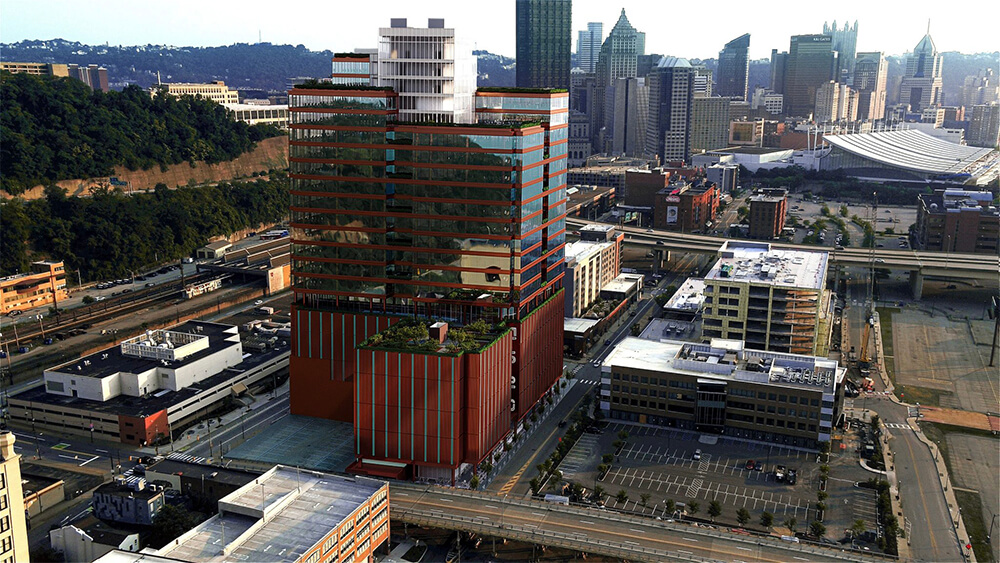
A static render shows a moment. A 3D architectural animation shows an experience. When a client watches a 60-second walkthrough of a building that doesn't exist yet, they're not evaluating drawings — they're deciding whether they want to live there, invest in it, or approve it. That shift from abstract to visceral is what makes animation worth commissioning for the right project.
In my experience, the confusion about architectural animation comes down to two things: not knowing which type to order, and not understanding when the additional cost is actually justified. This guide covers both, along with the full production pipeline, realistic pricing, and exactly what to hand a studio to get an accurate estimate.
Walkthrough vs. Flythrough: What's the Difference?
These two terms are used interchangeably by clients and sometimes by studios, but they describe fundamentally different camera experiences — and the distinction matters when you're briefing a project.
A walkthrough simulates eye-level movement through a space. The camera moves as a person would — through corridors, into rooms, across a lobby, out onto a terrace. It's the standard format for interior animations and for ground-level exterior approaches to a building. Walkthroughs are most effective for residential projects, hospitality interiors, retail environments, and any space where the quality of the interior experience is the thing being sold.
A flythrough (or flyover) uses an unconstrained camera that can move through and around a building at any height or angle. It's used for aerial sweeps of large sites, building reveals where the camera pulls back from close detail to full massing, and for master-planned developments where site organization is as important as building quality. Flythroughs are standard for developer presentations, planning submissions, and large-scale commercial or mixed-use projects.
Most architectural animations combine both modes: an exterior flythrough establishes the building in context, then the camera transitions inside for a walkthrough of key spaces. For a typical mixed-use or multifamily project, a 90-second animation will include 20–30 seconds of exterior aerial movement, a building approach at street level, and 40–50 seconds inside the key interior spaces.
Types of Architectural Animation
Beyond the walkthrough/flythrough distinction, there are several animation types organized by their purpose and output format:
Exterior animation focuses on the building facade, landscaping, streetscape, and neighborhood context. This is the most common type for planning submissions and investor presentations — it communicates massing, materiality, and neighborhood fit without requiring finished interior documentation.
Interior animation moves through furnished and finished interior spaces — unit types, amenity areas, lobbies, office floors. These require more resolved design documentation than exterior work because every surface, fixture, and piece of furniture needs to be modeled and textured.
Aerial / site animation shows large-scale sites from a bird's-eye perspective, often pulling back progressively to show site organization, phasing plans, or neighborhood context. Essential for multifamily communities, campuses, and master-planned developments where horizontal layout is a key part of the story.
Concept or design-development animations are lower-fidelity animations produced early in the design process to study massing, circulation, and spatial sequence. These aren't marketing assets — they're design tools. Produced in SketchUp or early-stage Revit models, they cost significantly less than finished marketing animations.
Sun study animations show how daylight moves through a space or across a facade over the course of a day or year. Common for planning submissions in jurisdictions that require shadow impact studies, and increasingly used for passive design documentation in sustainable architecture.
The Production Pipeline
Understanding the production pipeline helps you know what to provide, when to expect drafts, and where revision cycles typically happen.
Brief and storyboard: Before modeling begins, the studio needs a script or camera path description. For a simple 60-second animation, this might be a written description of each shot — "open with aerial approach from northwest, descend to street level, enter lobby, move through amenity corridor, exit to pool deck." For complex projects, a proper storyboard with shot-by-shot sketches is worth producing upfront. A misaligned camera path discovered at the final render stage is expensive to fix.
3D modeling: The building and site are modeled from your architectural documentation. If you already have a 3D model in Revit, SketchUp, or ArchiCAD, it can be imported and refined. Starting from 2D drawings takes longer. Exterior animation typically needs less detail in the model than interior work; the studio will optimize accordingly.
Texturing, lighting, and scene setup: Materials are applied to all surfaces, and the lighting environment is set up — sun position, time of day, artificial light sources for interior scenes. For exterior animations, lighting is often matched to a specific time of day to create the optimal atmospheric feel (usually late afternoon for golden-hour warmth).
Camera animation: The camera path is built and refined. This is where the "feel" of the animation comes from — the speed of movement, the easing in and out of shots, transitions between interior and exterior. A skilled animator can make the same model feel dramatic or serene depending on camera technique.
Rendering: Individual frames are rendered — typically at 25 or 30 frames per second. A 60-second animation at 30fps is 1,800 individual frames. Rendering is computationally intensive; studios use render farms to process frames in parallel. High-quality exterior renders with global illumination and ray tracing take significantly longer per frame than simplified interior passes.
Post-production: Rendered frames are assembled into video, color-graded, and delivered. Music, voiceover, motion graphics, and title cards are added if included in the brief. Delivery formats vary — MP4 for web and presentations, ProRes for broadcast or high-quality display, sometimes separate exports for different aspect ratios (16:9 for desktop, 9:16 for social).
Pricing: What Architectural Animation Actually Costs
Animation is priced by duration, complexity, and output quality. The ranges below reflect professional studio work — not offshore commodity production, which trades speed and price for quality that often doesn't hold up in a client presentation.
| Animation Type | Duration | Price Range | Timeline |
|---|---|---|---|
| Simple exterior flythrough | 30–45 sec | $1,500–$4,000 | 1–2 weeks |
| Full exterior + interior walkthrough | 60–90 sec | $4,000–$10,000 | 2–3 weeks |
| Complex multi-building / site animation | 90–180 sec | $8,000–$25,000 | 3–5 weeks |
| High-end marketing animation (4K, full post) | 2–3 min | $15,000–$50,000+ | 4–8 weeks |
| Sun study / shadow study | 30–60 sec | $800–$2,500 | 1–2 weeks |
The biggest variable is model complexity. If you're providing a clean Revit model at LOD 300 or above, the studio can move faster and the price comes in at the lower end. If you're starting from 2D drawings with no existing 3D geometry, expect to add 20–40% for modeling time. For current project-specific pricing, see our rendering and animation pricing page.
When Animation Is Worth It — and When Static Renders Are Enough
Animation is not the right choice for every project. The decision comes down to what you're trying to communicate and to whom.
Use animation when: The sequence of spaces is the story — entry, approach, arrival at amenities, transition from public to private. When the site is large and spatial organization can't be communicated in a single frame. When you're presenting to an audience that needs emotional engagement — pre-sales buyers, investors evaluating a luxury development, planning boards for a high-profile project. When you need a social media or broadcast asset that will drive attention beyond the presentation room.
Stick with static renders when: The project is a single building with a clear hero view. When the audience is technical — contractors, engineers, or planning reviewers who need accuracy, not atmosphere. When the budget is tight and the renders themselves are doing the selling. Static renders at high quality cost significantly less and often convert just as well for residential sales and investor decks.
A common mistake I see is commissioning a 3-minute animation for a project that would have been better served by six carefully composed static renders. The animation budget would have paid for a full render package — exterior, interior, aerial, and floor plans — that tells the complete story across multiple formats. For most residential and small commercial projects, that's the better investment. See our comparison of CGI visualization vs. traditional photography for more on matching the format to the use case.
What to Provide for an Animation Brief
Getting an accurate estimate and a fast production start requires a complete brief. Here's what a studio needs:
- Architectural drawings or 3D model: Floor plans, elevations, sections at minimum. A Revit, SketchUp, or ArchiCAD model accelerates production significantly.
- Camera path script: A written or sketched description of each shot sequence — where the animation starts, what it moves through, where it ends.
- Duration target: How long should the final animation be? 30 seconds? 90 seconds? This drives the price estimate.
- Material and finish specifications: Cladding type, window system, interior floor and wall finishes, furniture style and tone.
- Reference videos: Links to animations you like — for camera style, lighting mood, pacing, and post-production feel.
- Delivery format: Resolution (1080p, 4K), file format, aspect ratios needed, whether music or voiceover is included.
- Deadline: When do you need the final file? For complex animations, allow 3–5 weeks from brief to delivery.
Our exterior rendering and architectural animation services are often briefed together — the 3D model built for animation is used to produce the static hero renders in the same production pass, which is more cost-efficient than commissioning them separately. Read our guide on how to brief a rendering studio for more on preparing a complete project brief.
Need an Architectural Animation?
Send us your drawings and a description of the shots you need — we'll turn around a scoped estimate with pricing within 2 hours.
Request a Free Estimate