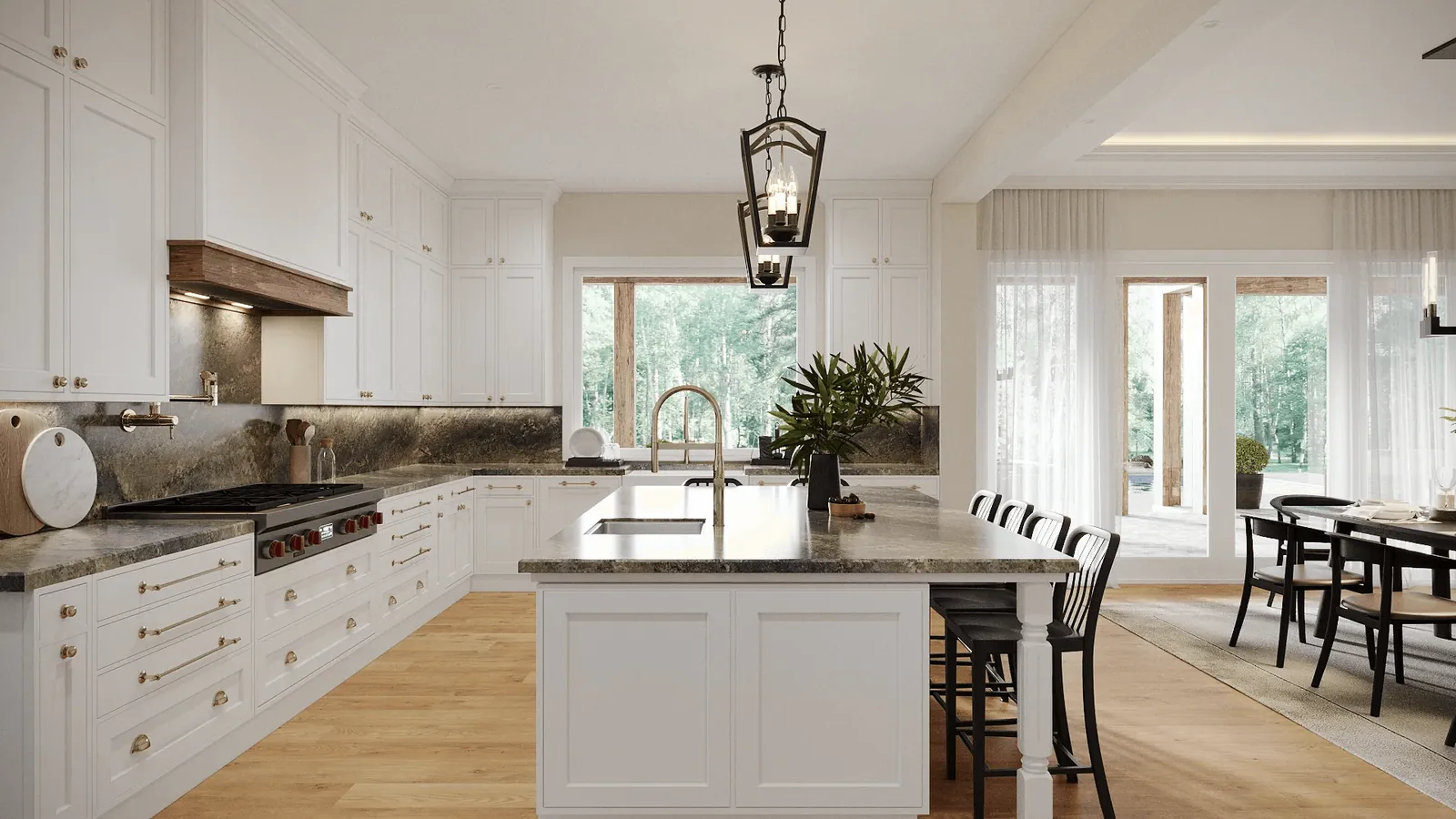
The kitchen is consistently the room that drives the most client anxiety during renovation and custom home projects — and for good reason. It's the most expensive room per square foot to build or renovate, it involves the highest density of irreversible material decisions, and it's the room where abstract plan drawings create the widest gap between what clients imagine and what actually gets built.
In my experience, kitchen renders pay for themselves faster than any other interior visualization type. The reason is straightforward: a photorealistic kitchen render converts every cabinet spec, countertop material, backsplash tile, and hardware selection into a visual reality that the client can approve with confidence rather than imagine with anxiety. When the render is approved, construction proceeds without the material second-guessing and mid-build change orders that add 15–30% to project cost on a significant percentage of kitchen renovations.
This guide covers what kitchen rendering involves, what it shows that drawings can't, how to brief one effectively, and what it costs.
What Kitchen 3D Rendering Shows
A kitchen rendering produces a photorealistic image of the kitchen at construction-document level of detail — all materials, all dimensions, all appliances, and all lighting as they will actually appear once built. The key elements that a good kitchen render communicates are:
Cabinet design and configuration. Door profile, finish, color, and hardware read clearly at the scale the client will actually live with them. Tall cabinets versus open shelving, the proportions of island versus perimeter cabinetry, and the vertical rhythm of the upper cabinet run — all of these are visible in a way that a plan and elevation can't convey. Clients who struggle to visualize cabinet layouts from shop drawings immediately understand the space from a render.
Countertop material in context. A 2-inch tile swatch of marble or quartz tells clients very little about how that material will read across 20 linear feet of countertop, in the light conditions of their actual space, next to their cabinet finish. A rendered kitchen with the specified countertop material, rendered at accurate scale and light, gives clients a truthful representation of what they're approving. This is a common "I didn't realize it would look like that" moments that renders prevent.
Lighting quality and effect. Kitchen lighting is complex — typically a combination of recessed ceiling fixtures, under-cabinet task lighting, pendant lights over the island, and natural light from windows. A render can show this combined lighting effect at the time of day the kitchen is most often used. Clients who want a bright, airy kitchen need to see how the design actually delivers this before committing to the layout; renders make this visible.
Spatial flow and ergonomics. Scale in a kitchen render reveals whether the island clearance reads as generous or tight, whether the ceiling height makes the room feel open or compressed, and whether the visual weight of the cabinetry is balanced across the space. Experienced kitchen designers use renders to spot and correct ergonomic issues — a work triangle that's too wide, a refrigerator that will dominate the entry view, a hood that looks disproportionate — before construction begins.
Appliance integration. Panel-front refrigerators, integrated dishwashers, drawer microwave placement, and range hood proportion are all visible in a render in a way that's difficult to assess from a plan. For European-style integrated kitchens where the appliance selection defines the cabinet run, renders are particularly valuable for confirming that the integrated design reads as intended.
What to Brief for a Kitchen Render
Kitchen renders require more detailed input than most other interior render types because of the sheer density of material and product specifications involved. A complete kitchen render brief includes:
- Dimensioned floor plan showing cabinet layout, island size, and appliance positions
- Cabinet elevations showing upper and lower configuration, heights, door profile, and hardware
- Material specifications for every surface: cabinet finish (color reference or paint code), countertop material and edge profile, backsplash tile (size, color, and pattern/layout), flooring material
- Appliance model numbers or specifications for refrigerator, range/cooktop, hood, dishwasher, and any built-in appliances
- Lighting specification: recessed layout, pendant type and position, under-cabinet lighting type
- Window and door locations and sizes
- Any decorative elements included: open shelving, decorative range hood, exposed brick or beams
The most common brief gaps I see are incomplete hardware specifications ("we haven't decided on pulls yet") and unspecified backsplash ("still choosing"). The studio will need to make assumptions for these elements; if the assumption is wrong, a revision round is required. It's worth confirming these decisions before briefing — or explicitly authorizing the studio to make a selection that matches the design direction.
Common Kitchen Rendering Scenarios
Kitchen renders are used across three distinct project types, each with slightly different brief requirements and priorities.
New custom home kitchen. The kitchen is being designed from scratch in a new construction or major gut renovation. The render is used to align the designer and client on the design direction, confirm material selections, and provide reference documentation for the cabinet shop and contractor. One primary view plus one secondary view (often showing the kitchen from the dining area looking back) is typically sufficient. For custom homes with significant kitchen investment, a 3D floor plan of the kitchen is also useful for communicating the layout to clients who struggle to read plan drawings.
Kitchen renovation with existing structure. The layout is partially constrained by existing plumbing, electrical, and structural elements. The render needs to clearly show how the proposed design works within these constraints, and how the renovated kitchen will relate to adjacent spaces. Showing the view from the living area into the kitchen is often as important as the kitchen-centric hero view, because a kitchen renovation changes the character of the whole open-plan living space.
Kitchen staging for real estate listing. An empty kitchen in a resale property, shown in a render with virtual furniture and styled accessories, makes the listing significantly more compelling than photography of an empty space. Virtual staging renders of kitchens are faster and cheaper than physical staging — and can show the kitchen in its best configuration even if the current owners have dated finishes that detract from the space's actual quality.
Pricing and Delivery
Kitchen renders are priced within the standard interior rendering range. A primary kitchen view — the main hero shot showing the full kitchen from the entry position — costs $500–$1,000 and takes 4–6 business days. A secondary view (island detail, cooking wall, window view) costs $400–$800 and takes 3–5 days when commissioned at the same time as the primary view, since the 3D model is shared.
For kitchen renovations or new custom homes where the kitchen is a significant design investment, a package of 2–3 views (primary view, secondary view, 3D floor plan) typically runs $1,200–$2,500 and provides thorough visual documentation for both the design approval process and the construction contract. See our pricing page for current rates, and our interior rendering service for the full scope of what we produce.
For further reading on how interior rendering fits into the broader design process, see our guides on rendering for interior designers and 3D rendering for homeowners. For context on bathroom rendering as a complement to kitchen work, see our bathroom 3D rendering guide.
Designing a Kitchen Project?
Share your floor plan and material selections — we'll scope a kitchen render package with pricing within 2 hours.
Request a Kitchen Render