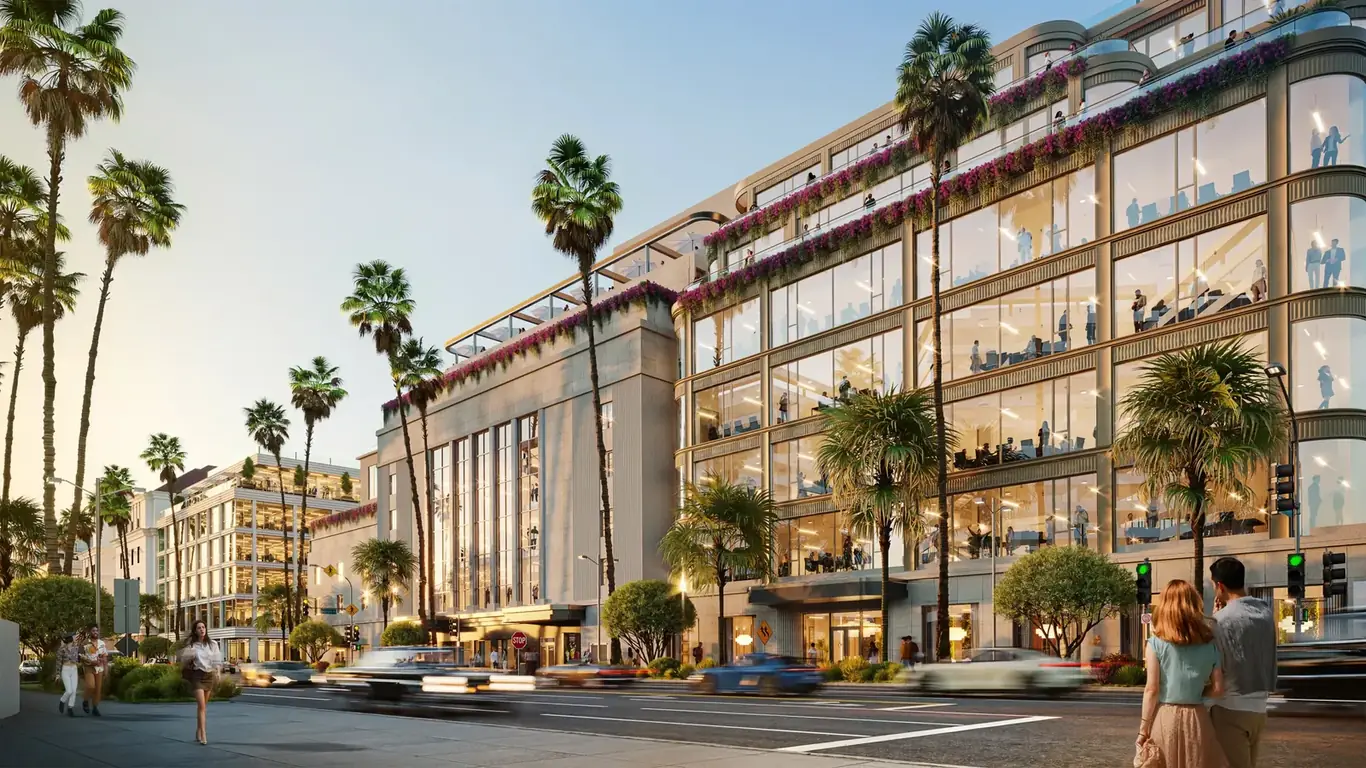
Architectural visualization for planning submissions serves a fundamentally different purpose than visualization for marketing or investor presentations. The audience isn't a buyer who needs to feel excited about a purchase — it's a review board that needs to evaluate a proposal against community standards, zoning requirements, and design guidelines. The goal isn't emotional resonance. It's clarity, accuracy, and context.
Getting this distinction right in your visualization brief makes the difference between a submission that moves through review efficiently and one that generates conditions, additional information requests, and extra review cycles. In my experience, well-prepared planning visualization packages — ones that proactively answer the questions review boards are going to ask — reduce approval times significantly compared to packages that leave those questions for the board to raise.
Research supports this: architectural visualization reduces approval times by approximately 30%, cuts revision rounds by 50%, and improves stakeholder comprehension of proposed designs by 40%. Those numbers reflect what happens when the visualization is genuinely calibrated to the review audience — not just repurposed marketing renders submitted in a planning folder.
Planning Renders vs. Marketing Renders: The Core Difference
The same set of renders rarely serves both planning and marketing purposes well. The requirements are different in almost every dimension:
- Accuracy over aspiration: Marketing renders can use flattering camera angles, idealized lighting, and atmospheric effects that make the building look its best. Planning renders must accurately represent height, massing, and material as they will actually appear. Exaggerated perspectives that make a building appear smaller than it is will be noticed by technically trained review staff — and undermine the submission's credibility.
- Context over isolation: Marketing renders often isolate the building against a clean sky or minimal context. Planning renders need surrounding buildings, streetscape, trees, and pedestrian environment to answer the question "how does this fit here?"
- Measurement-accurate views: Planning boards often look at rendered perspectives alongside scaled elevations. The proportions must match. A render that appears to show a different building from the submitted elevations creates confusion and questions.
- Neutral post-processing: Heavy atmospheric post-processing that softens edges, adds dramatic lens flare, or saturates colors to make the building look warmer reads as spin to planning reviewers. Clean, neutral color grading is more credible in this context.
Who Reviews Planning Submissions — and What They Look For
Planning commissions and design review boards have mixed audiences. Technical members — architects, planners, engineers — will read elevations, dimensions, and material specifications. Non-technical board members and community members at public hearings form their impressions primarily from the renderings.
Non-technical reviewers are asking these questions when they look at your renders:
- Does this building fit the neighborhood scale and character?
- Will it overshadow adjacent residential properties?
- What will pedestrians experience at street level?
- How does the massing relate to surrounding structures?
- Does the proposed landscaping feel integrated or cosmetic?
A visualization package that answers all of these questions visually — before board members have to ask — moves through review faster and with fewer conditions attached. One that leaves these questions unanswered invites requests for additional information and additional review cycles.
Standard Views Required for Planning Submissions
Most planning jurisdictions don't specify exactly which views are required — they require sufficient visualization to evaluate the proposal. In practice, a standard view set has emerged that satisfies most US review bodies. These are the views I recommend for any planning submission:
Street-Level Perspective from the Primary Public Approach
This is the view a pedestrian has when approaching the building from the main street. It should show the full primary facade at human scale, including ground-floor activation, entry treatment, relationship to the sidewalk and street trees, and adjacent buildings on both sides. This view receives the most scrutiny in design review and should be treated as the priority deliverable.
Context View Showing Adjacent Properties
A view showing the proposed building alongside neighboring structures communicates scale and massing relationships that elevations cannot convey on their own. Planning boards need to understand how the new building will read relative to what's already there. This view should show actual neighboring buildings, not generic placeholders.
Aerial or Bird's-Eye View
For larger developments, an aerial view showing the roof form, site coverage, parking configuration, landscaping, and relationship to surrounding blocks helps boards evaluate massing and site planning from above. Urban infill projects may not need this; larger development sites almost always do. Projects with structured parking as a significant design element often require a dedicated parking structure rendering to demonstrate how the garage integrates with the overall development. Our aerial rendering service covers this view type specifically.
Secondary and Sensitive Viewpoints
Secondary facades facing neighboring residential properties, rear elevations for projects abutting sensitive zones, views from parks or public spaces that the planning department has identified as important viewpoints. Check with your planning contact about whether specific viewpoints are required before briefing the studio.
Shadow Studies
Shadow studies — diagrams showing how the building's shadow falls on surrounding properties at multiple times of day and in different seasons — are required in many jurisdictions, particularly for taller buildings in established residential neighborhoods. They are technically distinct from photorealistic renders but are typically part of the same visualization package. Not all rendering studios produce these as a standard service; confirm the capability upfront if your project requires them.
Photomontage: When It's Required and How It Works
Photomontage — compositing a 3D render into an actual photograph of the existing site — is increasingly required or strongly preferred in urban jurisdictions with active design review. It directly answers the question boards most often ask: "What will this actually look like standing on that specific street corner?"
Producing a credible photomontage for planning purposes requires substantially more rigor than a simple compositing exercise:
- Survey photography: Photographs taken from fixed positions that are GPS-surveyed so the camera location is known precisely. The position needs to be documented, because review boards may revisit the same viewpoint after construction.
- Matched lens calibration: The 3D render camera must match the focal length, sensor format, and lens distortion of the survey camera exactly. Any mismatch is visible as a perspective inconsistency.
- Accurate sun position and shadow casting: Shadows in the render must match the time of day and date of the survey photograph. The sun angle is calculable from GPS coordinates, date, and time — using the correct values is non-negotiable for credibility.
- Color and atmospheric matching: The render must be color-graded to match the ambient light, sky conditions, and atmospheric haze in the photograph. An incorrectly color-graded photomontage reads as unconvincing immediately.
Done well, a photomontage is indistinguishable from a photograph of the completed building. Done poorly, it's obvious — and an obvious photomontage does the opposite of what you want: it draws attention to the artificiality of the submission rather than building confidence in the design. This is a case where the quality of the studio matters directly to the planning outcome.
Accuracy Requirements: What "Accurate" Actually Means for Planning
Planning renders must accurately represent the design as submitted in the application. A render that shows a building materially different from the design documents — different height, different facade materials, different massing articulation — creates problems at multiple stages: during review, during conditions assessment, during construction administration, and potentially in disputes if approved conditions are based on what the render showed.
This is a more common problem than it sounds. It typically happens when renders are produced at the concept stage and the design evolves before submission without the renders being updated, or when the architect and renderer are working from different drawing versions. The fix is simple but requires discipline: establish a design freeze point before commissioning planning renders, and confirm that the renderer is working from exactly the documents being submitted — same revision date, same drawing numbers.
Material accuracy matters too. If the submitted drawings specify brick veneer and the render shows glass curtain wall, the board will flag the discrepancy. In jurisdictions with conditions attached to materials, an inaccurate render can complicate construction later if the actual materials differ from what was rendered.
Design Review vs. Planning Commission: Different Audiences, Different Needs
Many jurisdictions have separate processes for design review and planning/zoning approval, each with different mandates and different audiences. Understanding which body your submission is going to — and what they care about — should inform how the renders are briefed. For civic and public building submissions — including cultural facility rendering for museums, libraries, and community centers — CEQA review often has specific visual impact analysis requirements beyond standard design review.
Design review boards focus on architectural quality: facade composition, material quality, relationship to neighborhood character, streetscape activation, and design consistency with applicable design guidelines. These bodies include design professionals and respond to design quality arguments. Renders for design review can show more nuance in materials and texture because the audience can read it.
Planning commissions focus on land use, zoning compliance, massing, and community impact. Their membership is often broader and less design-focused. Renders for planning commission submissions need to emphasize context, scale, and neighborhood fit rather than architectural detail.
If your project goes through both processes, brief the studio to produce views for each audience — which may mean different camera positions, different post-processing treatments, and different levels of detail emphasis.
Timing Your Planning Visualization Package
Planning renders are time-critical in a way that marketing renders aren't. A permit submission has a fixed deadline; a missed deadline often means waiting for the next review cycle, which may be 4–8 weeks away. Factor rendering production time into your submission timeline from the outset, not as an afterthought after drawings are complete.
Standard exterior renders for planning can be produced in 5–10 business days from receipt of complete drawings. Photomontages take longer — typically 10–15 business days — because of the survey photography and calibration work involved. Rush production is available but adds 20–50% to cost. The safest approach is to commission renders as soon as the design is stable enough that no changes will require re-rendering before the submission date.
Build the rendering timeline into your project schedule as a milestone, not a task to be done "when the drawings are ready." Experienced project managers treat the rendering commission as a parallel track that starts as soon as design development is substantially complete.
For details on our exterior rendering capabilities and how we structure planning packages, see our exterior rendering service. For pricing, see our pricing page. Browse our portfolio for context renders and photomontage examples across commercial and residential project types.
For context on how planning visualization fits into broader development workflow, see our guide on exterior rendering for real estate developers. For hospitality-specific planning considerations, see our guide on hotel and hospitality rendering. Projects requiring zoning application renderings for variance or use permits follow similar accuracy standards to the planning renders described here. Developments pursuing LEED certification or green building approval benefit from sustainable architecture visualization that accurately represents energy-efficient design features.
Have a Planning Submission Coming Up?
Share your drawings and submission timeline and we'll scope a visualization package that meets your review board's requirements.
Request a Free Estimate